
If your field logbook gets filled in at the end of the season from the foreman's notebook and the delivery notes from the warehouse, setting up a digital field logbook starts by changing when you make the entry: every treatment and every fertiliser application is recorded on the day it happens, in a program where your plots, your products and your applicators are already set up. For plant protection treatments there is some urgency, because from 01/01/2027 their record must be kept on an electronic medium. Below you will find which part has a deadline, what to prepare, the steps one by one, the mistakes that force you to start again and how it looks in GAP.
Which part of the digital field logbook has a deadline
Before deciding where you will keep it, separate what has a deadline from what remains voluntary. Each record has its own rule and its own calendar, and mixing them up leads to rushed changes.
| Record | Format | Date | Rule |
|---|---|---|---|
| Plant protection treatments | Paper accepted | Until 31/12/2026 | RD 1311/2012 (Spanish royal decree on the sustainable use of plant protection products), amended by RD 1039/2025 |
| Plant protection treatments | Computer-based, electronic and machine-readable medium | From 01/01/2027 | RD 1311/2012, amended by RD 1039/2025 |
| Fertilisation | Paper or digital, recorded within one month at most | From 01/01/2026 | RD 1051/2022 (Spanish royal decree on sustainable nutrition of agricultural soils), amended in 2025 |
| Fertilisation plan | Mandatory | In general, from 01/09/2026 | RD 1051/2022, amended in 2025 |
| Complete digital farm logbook | Voluntary | Until the next CAP (Common Agricultural Policy) framework | RD 34/2025 |
Treatments are the only record with a fixed date for the electronic medium. It is set out in article 16.1 of RD 1311/2012, as worded by the first final provision of Real Decreto 1039/2025, published in the BOE (Spain's official state gazette) on 20/11/2025. The rest of the farm logbook can stay on paper until the next CAP framework, according to Real Decreto 34/2025 (BOE-A-2025-998).
For fertiliser use, the reference is the press release from the Ministry of Agriculture of 21/10/2025 on sustainable soil nutrition. You can find the exceptions and deadlines in our post on the fertilisation record required by sustainable nutrition rules.
Until 31/12/2026 paper records of treatments are still accepted. From 01/01/2027 plant protection treatments must be recorded on an electronic medium, so the season starting now is the right one to make the change calmly rather than debuting on New Year's Day.
Our view: if treatments are going into a program anyway, keep fertiliser use and irrigation there too. Half a logbook on paper and half on the computer works until the technician has to cross-check a fertiliser order with a treatment from the same week and each one is in a different place.
What you need to prepare before you start
With the basic data in order before you begin, day-to-day work comes down to confirming what has been done in the field. Gather the following:
- The holding's details as they appear in the regional register. If you are unsure what it holds, we explain it in what the REA (the farm holdings register) is and what it has to do with the digital logbook.
- The farms and plots, each with its SIGPAC (Spain's land parcel identification system) enclosure, crop, variety and area.
- The level at which you are going to record. If you decide to work by irrigation sectors or by decision units, the logbook has to go down to that level; the post on the decision unit in farm management will help.
- The plant protection products and fertilisers that go into the warehouse, under the same name as on the supplier's delivery notes.
- Who applies on each farm, with which tractor and with which equipment.
- The technician who signs the treatment and fertiliser orders.
All of this is set up once. After that it only needs touching when the season changes: a plot that is grubbed up, a new variety, an applicator who joins the crew.
How to set up the digital field logbook step by step
1. Build the holding's tree
Start at the top: farms, crops, varieties and plots. Each plot with its area and its SIGPAC enclosure, so that whatever you record later lands in the right place. If you have two varieties in the same enclosure, separate them now: you will want treatments and costs by variety.
2. Register the products and warehouses
Register each product with its active substance and the warehouse where it is kept. When an order arrives, you book in the delivery note; when a product moves to another farm's warehouse, you make a transfer between warehouses. That way the active substance comes from the product record and nobody types it in by hand for every treatment.
3. Turn every treatment order into a record
The technical order signed by the technician already contains almost the whole plant protection treatment record: destination plots, product, dose, pest, tractor and equipment. When the applicator finishes, all that is left is to confirm the actual date and the quantity applied. That entry, confirmed the same day, is your record, with no waiting until the end of the month.
4. Record each fertiliser application before a month has passed
Since 01/01/2026 every input of nutrients or organic matter goes into the logbook within one month at most. If you fertilise through fertigation, work with irrigation and fertiliser orders by irrigation sector: what is applied in each sector is split between the plots that depend on it and the entry comes from the order itself.
5. Close the week by cross-checking with the warehouse
What is applied in the field has to match what left the warehouse. If theoretical and actual stock do not agree, either a treatment is waiting to be recorded or one has been entered wrongly. Reviewed every week, the discrepancy shows up while the order is still recent; by December nobody remembers.
6. Pull up the record when you are asked for it
When the GLOBALG.A.P. or integrated production auditor asks which active substance was applied on a plot in March, you filter by plot and dates and have it in front of you. Certification is granted by the certification body; your job is to have complete records. For that visit, see how to arrive at the GlobalG.A.P. audit with everything up to date.
If today the treatment order reaches the applicator on paper and someone then copies it into the logbook, in GAP the technical order and the entry come from the same record, with the active substance linked to the warehouse product: request information on how it would work with your farms.
Mistakes that force you to redo the logbook
- Writing up work reports at the end of the month. Dates are lost, plots get mixed up and the one-month deadline for fertiliser records slips away.
- Plots in the program that do not match the SIGPAC enclosures. The treatment is recorded, but against an area different from the one declared.
- Products with one name in the warehouse and another in the logbook. When you search for the active substance, two records come up and neither adds up.
- A shared spreadsheet where there is no trace of who changed a cell or when.
- Leaving pre-harvest intervals until the end. Here is how to control pre-harvest intervals before harvesting.
The mistakes made when recording each treatment, field by field, are covered in the post on mistakes when recording treatments in the digital logbook.
How the field logbook looks in GAP
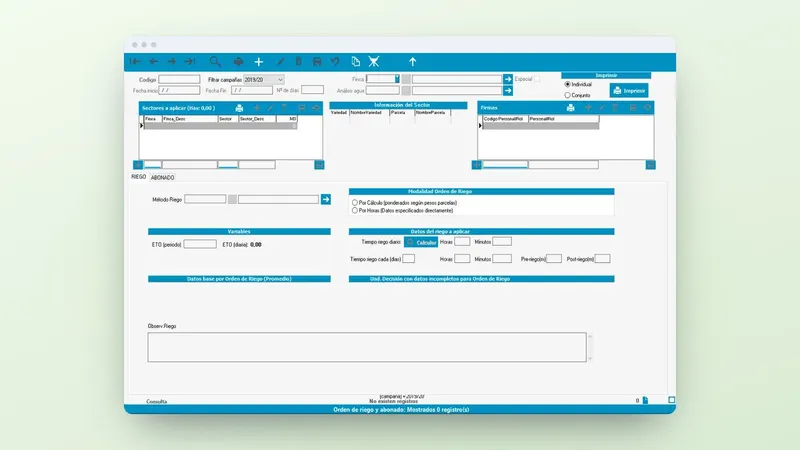
In GAP (Gestión Agrícola Parametrizable, a configurable farm management program) the technician issues fertiliser, irrigation and treatment orders. The plant protection treatment order record includes the farm, the task, the destination plots, the items with their dose and pre-harvest interval, the pests, the tractor and the equipment.
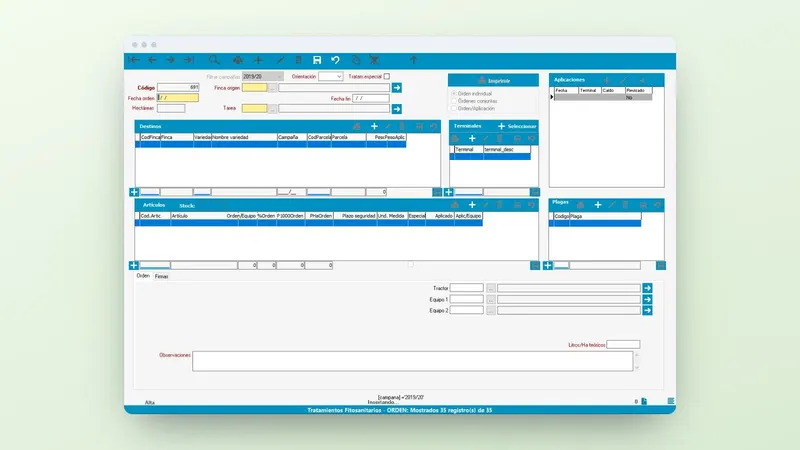
The screenshot comes from an earlier version of the application, but the idea is clear: order and record in the same form. From there, GAP keeps track of the active substances and products applied by farm, variety and plot, and follows the product from the supplier order, goods receipt and transfer through to use in the field. You can find it in irrigation, fertiliser and treatments and in traceability and stock.
For fertiliser use, the irrigation and fertiliser order works by irrigation sector, with the irrigation method, the ETo calculation, the daily irrigation time and the signatures of whoever issues it and whoever carries it out.
Because every treatment and every fertiliser application carries its product and its plot, the same data is later used for the cost per plot, broken down by item or task, and can be viewed on the map by plot or by variety. The full approach is on the page about the digital farm logbook in GAP.
What to do this week to get started
- Gather in a single document the plots with their SIGPAC enclosure, variety and area, and the warehouse products under the name on the delivery note.
- Decide where you will record treatments from now on, so that you reach 01/01/2027 with the system already running smoothly.
- Test the whole cycle with a single farm: order, confirmed application and a check against the warehouse at the close of the week.
If you would like to see how the treatment and fertiliser orders for your holding would look in GAP, request information using the form on this page or call +34 959 54 07 12, Monday to Friday, 8:00 to 15:00 and 16:00 to 19:00.